BoldSign AI Assistant
Chat with the BoldSign AI Assistant
Add Radio Button Field
A radio button allows a signer to select only one option from a predefined list of choices. When presented as a group, selecting one radio button will automatically deselect any previously selected option within that group, ensuring that only one option can be chosen at a time.
BoldSign provides support for adding radio buttons to your document before sending it to the signer, enabling them to make a choice by clicking on the radio button.
Send a document with radio buttons
To send a document with a radio buttons, set the fieldType as RadioButton. Additionally, you need to specify a groupName to group related radio buttons together.
Here are example codes that demonstrate how to achieve this:
Code snippet
curl -X 'POST' \ 'https://api.boldsign.com/v1/document/send' \
     -H 'accept: application/json' \
     -H 'X-API-KEY: {your API key}' \
     -H 'Content-Type: multipart/form-data' \
     -F 'Message=' \
     -F 'Signers=
     {
        "name": "Hanky",
        "emailAddress": "[email protected]",
        "signerType": "Signer",
        "formFields": [
           {
                "id": "string",
                "name": "string",
                "fieldType": "RadioButton",
                "groupName": "Group1",
                "pageNumber": 1,
                "bounds": {
                  "x": 50,
                  "y": 50,
                  "width": 20,
                  "height": 20
                   },
                "isRequired": true
            },
            {
                "id": "string1",
                "name": "string1",
                "fieldType": "RadioButton",
                "groupName": "Group1",
                "pageNumber": 1,
                "bounds": {
                  "x": 100,
                  "y": 100,
                  "width": 20,
                  "height": 20
                   },
                "isRequired": true
            }
        ],
        "locale": "EN"
     }' \
     -F 'Files={your file}' \
     -F 'Title={title}' \
var apiClient = new ApiClient("https://api.boldsign.com", "{your API key}");
var documentClient = new DocumentClient(apiClient);

var documentFilePath = new DocumentFilePath
{
   ContentType = "application/pdf",
   FilePath = "{Your file path}",
};

var filesToUpload = new List<IDocumentFile>
{
    documentFilePath,
};

var radioButton1 = new RadioButtonField(
    id: "Radio1",
    isRequired: true,
    groupName: "Group1",
    pageNumber: 1,
    bounds: new Rectangle(x: 50, y: 50, width: 20, height: 20));

var radioButton2 = new RadioButtonField(
    id: "Radio2",
    isRequired: true,
    groupName: "Group1",
    pageNumber: 1,
    bounds: new Rectangle(x: 100, y: 100, width: 20, height: 20));

var formFieldCollections = new List<FormField>()
{
    radioButton1,
    radioButton2
};

var signer = new DocumentSigner(
  signerName: "Signer Name 1",
  signerType: SignerType.Signer,
  signerEmail: "[email protected]",
  formFields: formFieldCollections,
  locale: Locales.EN);

var documentSigners = new List<DocumentSigner>()
{
    signer
};

var sendForSign = new SendForSign()
{
    Message = "please sign this",
    Title = "Agreement",
    Signers = documentSigners,
    Files = filesToUpload
};
var documentCreated = documentClient.SendDocument(sendForSign);
import boldsign

configuration = boldsign.Configuration(host = "https://api.boldsign.com", api_key = "YOUR_API_KEY")

with boldsign.ApiClient(configuration) as api_client:

    document_api = boldsign.DocumentApi(api_client)

    form_fields = [
        boldsign.FormField(
            id = "RadioButton1",
            name = "RadioButtonField",
            fieldType = "RadioButton",
            pageNumber = 1,
            font = "Helvetica",
            groupName = "Group1",
            bounds = boldsign.Rectangle(x = 50, y = 50, width = 200, height = 25),
            isRequired = True
        ),
        boldsign.FormField(
            id = "RadioButton2",
            name = "RadioButton",
            fieldType = "RadioButton",
            groupName = "Group1",
            font = "Helvetica",
            pageNumber = 1,
            bounds = boldsign.Rectangle(x = 150, y = 250, width = 200, height = 25),
            isRequired = True
        ),
    ]

    document_signer = boldsign.DocumentSigner(
        name = "David",
        emailAddress = "[email protected]",
        signerType = "Signer",
        formFields = form_fields,
        locale = "EN"
    )

    send_for_sign = boldsign.SendForSign(
        document_title = "SDK Document Test case",
        description = "Testing document from SDK integration test case",
        files = ["YOUR_FILE_PATH"],
        disableExpiryAlert = False,
        reminderSettings = boldsign.ReminderSettings(
            reminderDays = 3,
            reminderCount = 5,
            enableAutoReminder = False
        ),
        enableReassign = True,
        message = 'Please sign this.',
        signers = [document_signer],
        expiryDays = 10,
        enablePrintAndSign = False,
        AutoDetectFields = False,
        enableSigningOrder = False,
        useTextTags = False,
        title = "Document SDK API",
        hideDocumentId = False,
        enableEmbeddedSigning = False,
        expiryDateType = 'Days',
        expiryDate = 60,
        disableEmails = False,
        disableSMS = False,
    )

    document_created = document_api.send_document(send_for_sign)
<?php require_once "vendor/autoload.php";

use BoldSign\Configuration;
use BoldSign\Api\DocumentApi;
use BoldSign\Model\{FormField, Rectangle, DocumentSigner, SendForSign, DocumentInfo, FileInfo, ReminderSettings};

$config = new Configuration();
$config->setHost("https://api.boldsign.com");
$config->setApiKey('YOUR_API_KEY');

$document_api = new DocumentApi($config);

$radio_child_first = new FormField();
$radio_child_first->setid('RadioButton1');
$radio_child_first->setName('RadioButton');
$radio_child_first->setFieldType('RadioButton');
$radio_child_first->setPageNumber(1);
$radio_child_first->setFont('Helvetica');
$radio_child_first->setIsRequired(true);
$radio_child_first->setGroupName('Group1');
$first_child_bounds = new Rectangle([50, 50, 100, 150]);
$radio_child_first->setBounds($first_child_bounds);

$radio_child_second = new FormField();
$radio_child_second->setid('RadioButton2');
$radio_child_second->setName('RadioButton');
$radio_child_second->setFieldType('RadioButton');
$radio_child_second->setPageNumber(1);
$radio_child_second->setFont('Helvetica');
$radio_child_second->setIsRequired(true);
$radio_child_second->setGroupName('Group1');
$second_child_bounds = new Rectangle([50, 50, 100, 150]);
$radio_child_second->setBounds($second_child_bounds);

$document_signer = new DocumentSigner();
$document_signer->setName('David');
$document_signer->setEmailAddress('[email protected]');
$document_signer->setSignerType('Signer');
$document_signer->setLocale('EN');
$document_signer->setFormFields([$radio_child_first, $radio_child_second]);

$send_for_sign = new SendForSign();

$documentInfo = new DocumentInfo();
$documentInfo->setTitle('SDK Document Test case');
$documentInfo->setDescription('Testing document from SDK integration test case');
$send_for_sign->setDocumentInfo([$documentInfo]);

$files = new FileInfo();
$files = 'YOUR_FILE_PATH';
$send_for_sign->setFiles([$files]);

$send_for_sign->setDisableExpiryAlert(false);
$reminder_settings = new ReminderSettings();
$reminder_settings->setReminderDays(3);
$reminder_settings->setReminderCount(5);
$reminder_settings->setEnableAutoReminder(false);
$send_for_sign->setReminderSettings($reminder_settings);
$send_for_sign->setEnableReassign(true);
$send_for_sign->setMessage('Please sign this.');
$send_for_sign->setSigners([$document_signer]);
$send_for_sign->setEnablePrintAndSign(false);
$send_for_sign->setExpiryDateType('Days');
$send_for_sign->setExpiryValue(10);
$send_for_sign->setDisableEmails(false);
$send_for_sign->setDisableSMS(false);
$send_for_sign->setAutoDetectFields(false);
$send_for_sign->setEnableSigningOrder(false);
$send_for_sign->setUseTextTags(false);
$send_for_sign->setTitle('Document SDK API');
$send_for_sign->setHideDocumentId(false);

$document_created = $document_api->sendDocument($send_for_sign);
ApiClient client = Configuration.getDefaultApiClient();
client.setBasePath("https://api.boldsign.com");
client.setApiKey("YOUR_API_KEY");

DocumentApi documentApi = new DocumentApi(client);

FormField radioChildFirst = new FormField();
radioChildFirst.setId("RadioButton1");
radioChildFirst.setName("RadioButton");
radioChildFirst.setFieldType(FormField.FieldTypeEnum.RADIO_BUTTON);
radioChildFirst.setPageNumber(1);
radioChildFirst.setFont(FormField.FontEnum.HELVETICA);
radioChildFirst.setIsRequired(true);
radioChildFirst.setGroupName("Group1");
Rectangle firstChildBounds = new Rectangle().x(100f).y(100f).width(100f).height(50f);
radioChildFirst.setBounds(firstChildBounds);

FormField radioChildSecond = new FormField();
radioChildSecond.setId("RadioButton2");
radioChildSecond.setName("RadioButton");
radioChildSecond.setFieldType(FormField.FieldTypeEnum.RADIO_BUTTON);
radioChildSecond.setPageNumber(1);
radioChildSecond.setFont(FormField.FontEnum.HELVETICA);
radioChildSecond.setIsRequired(true);
radioChildSecond.setGroupName("Group1");
Rectangle secondChildBounds = new Rectangle().x(100f).y(100f).width(100f).height(50f);
radioChildSecond.setBounds(secondChildBounds);

DocumentSigner signer = new DocumentSigner();
signer.setName("David");
signer.setEmailAddress("[email protected]");
signer.setSignerType(DocumentSigner.SignerTypeEnum.SIGNER);
ArrayList<FormField> formFields = new ArrayList<FormField>();
formFields.add(radioChildFirst);
formFields.add(radioChildSecond);
signer.setFormFields(formFields);
signer.setLocale(DocumentSigner.LocaleEnum.EN);

SendForSign sendForSign = new SendForSign();

File file = new File("YOUR_FILE_PATH");
sendForSign.setFiles(Arrays.asList(file));

sendForSign.setTitle("SDK Document Test case");
ReminderSettings reminderSettings = new ReminderSettings();
reminderSettings.setReminderDays(3);
reminderSettings.setReminderCount(5);
reminderSettings.setEnableAutoReminder(false);
sendForSign.setReminderSettings(reminderSettings);
sendForSign.setDisableExpiryAlert(false);
sendForSign.setEnableReassign(true);
sendForSign.setMessage("Please sign this.");
sendForSign.setSigners(Arrays.asList(signer));
sendForSign.setEnablePrintAndSign(false);
sendForSign.setExpiryDateType(SendForSign.ExpiryDateTypeEnum.DAYS);
sendForSign.setExpiryValue(10L);
sendForSign.setDisableEmails(false);
sendForSign.setDisableSMS(false);
sendForSign.setAutoDetectFields(false);
sendForSign.setEnableSigningOrder(false);
sendForSign.setUseTextTags(false);
sendForSign.setHideDocumentId(false);

DocumentCreated documentCreated = documentApi.sendDocument(sendForSign);
import { DocumentApi, DocumentSigner, DocumentInfo, FormField, Rectangle, SendForSign, ReminderSettings } from "boldsign";
import * as fs from 'fs';

const documentApi = new DocumentApi("https://api.boldsign.com");
documentApi.setApiKey("YOUR_API_KEY");

const firstChildBounds = new Rectangle();
firstChildBounds.x = 100;
firstChildBounds.y = 50;
firstChildBounds.width = 100;
firstChildBounds.height = 100;

const secondChildBounds = new Rectangle();
secondChildBounds.x = 100;
secondChildBounds.y = 50;
secondChildBounds.width = 100;
secondChildBounds.height = 100;

const radioChildFirst = new FormField();
radioChildFirst.id = "RadioButton1";
radioChildFirst.name = "RadioButton";
radioChildFirst.fieldType = FormField.FieldTypeEnum.RadioButton;
radioChildFirst.font = FormField.FontEnum.Helvetica;
radioChildFirst.pageNumber = 1;
radioChildFirst.isRequired = true;
radioChildFirst.groupName = "Group1";
radioChildFirst.bounds = firstChildBounds;

const radioChildSecond = new FormField();
radioChildSecond.id = "RadioButton2";
radioChildSecond.name = "RadioButton";
radioChildSecond.fieldType = FormField.FieldTypeEnum.RadioButton;
radioChildSecond.font = FormField.FontEnum.Helvetica;
radioChildSecond.pageNumber = 1;
radioChildSecond.isRequired = true;
radioChildSecond.groupName = "Group1";
radioChildSecond.bounds = secondChildBounds;

const documentSigner = new DocumentSigner();
documentSigner.name = "David";
documentSigner.emailAddress = "[email protected]";
documentSigner.signerType = DocumentSigner.SignerTypeEnum.Signer;
documentSigner.formFields = [radioChildFirst, radioChildSecond];
documentSigner.locale = DocumentSigner.LocaleEnum.En;

const files = fs.createReadStream("YOUR_FILE_PATH");

const sendForSign = new SendForSign();

const documentInfo = new DocumentInfo();
documentInfo.title = "SDK Document Test case";
documentInfo.description = "Testing document from SDK integration test case";
sendForSign.documentInfo = [documentInfo];

sendForSign.title = "Document SDK API";
sendForSign.signers = [documentSigner];
sendForSign.files = [files];
const reminderSettings = new ReminderSettings();
reminderSettings.enableAutoReminder = false;
reminderSettings.reminderCount = 5;
reminderSettings.reminderDays = 3;
sendForSign.reminderSettings = reminderSettings;
sendForSign.disableExpiryAlert = false;
sendForSign.enableReassign = true;
sendForSign.message = "Please sign this.";
sendForSign.enablePrintAndSign = false;
sendForSign.expiryDateType = SendForSign.ExpiryDateTypeEnum.Days;
sendForSign.expiryDays = 10;
sendForSign.disableEmails = false;
sendForSign.disableSMS = false;
sendForSign.autoDetectFields = false;
sendForSign.enableSigningOrder = false;
sendForSign.useTextTags = false;
sendForSign.hideDocumentId = false;
sendForSign.enableEmbeddedSigning = false;

const documentCreated = documentApi.sendDocument(sendForSign);
In the above examples, make sure to replace fieldType with RadioButton and specify a groupName to group related radio buttons. Execute the provided code, making sure to provide the necessary fields such as Files, Title, and Signers. By doing so, the document will be sent to the signers with the radio buttons, allowing them to make a selection when signing.
Send a document with radio button form field using a definition tag
For the information about the definition tags, please refer to the documentation: Definition tags
Code snippet using a definition tag
curl -X POST 'https://api.boldsign.com/v1/document/send' \
      url -X POST 'https://api.boldsign.com/v1/document/send' \
      -H 'X-API-KEY: {your-api-key}' \
      -F 'Title=Sent from API Curl' \
      -F 'Message=This is document message sent from API Curl' \
      -F 'EnableSigningOrder=false' \
      -F 'Signers[0][Name]=Signer Name 1' \
      -F 'Signers[0][EmailAddress][email protected]' \
      -F 'Signers[0][SignerOrder]=1' \
      -F 'UseTextTags=true' \
      -F 'TextTagDefinitions[0][DefinitionId]=tag1' \
      -F 'TextTagDefinitions[0][Type]=RadioButton' \
      -F 'TextTagDefinitions[0][SignerIndex]=1' \
      -F 'TextTagDefinitions[0][IsRequired]=True' \
      -F 'TextTagDefinitions[0][RadioGroupName]=string' \
      -F 'TextTagDefinitions[0][Size][Width]=20' \
      -F 'TextTagDefinitions[0][Size][Height]=20' \
      -F 'TextTagDefinitions[0][FieldId]=axq12367' \
      -F 'TextTagDefinitions[1][DefinitionId]=tag2' \
      -F 'TextTagDefinitions[1][Type]=RadioButton' \
      -F 'TextTagDefinitions[1][SignerIndex]=1' \
      -F 'TextTagDefinitions[1][IsRequired]=True' \
      -F 'TextTagDefinitions[1][RadioGroupName]=string' \
      -F 'TextTagDefinitions[1][Size][Width]=20' \
      -F 'TextTagDefinitions[1][Size][Height]=20' \
      -F 'TextTagDefinitions[1][FieldId]=eq1267' \
      -F 'Files=@{your file};type=application/pdf' \
ApiClient apiClient = new ApiClient("https://api.boldsign.com", "{Your API Key}");
DocumentClient documentClient = new DocumentClient(apiClient);

// Directly provide file path of the document.
var documentFilePath = new DocumentFilePath
{
    ContentType = "application/pdf",
    FilePath = "{your file}"

};

// Creating collection with all loaded documents.
var filesToUpload = new List<IDocumentFile>
{
    documentFilePath,
};

var signer = new DocumentSigner(
  signerName: "Signer Name 1",
  signerType: SignerType.Signer,
  signerEmail: "[email protected]",
  locale: Locales.EN);

// Adding the signer to the collection.
var documentSigners = new List<DocumentSigner>
{
    signer
};

TextTagDefinition textTagDefinition = new TextTagDefinition(
    definitionId: "tag1",
    type: FieldType.RadioButton,
    size: new Size(
        width: 20,
        height: 20),
    signerIndex: 1,
    isRequired: true,
    radioGroupName: "Group1"
);

TextTagDefinition textTagDefinition1 = new TextTagDefinition(
    definitionId: "tag2",
    type: FieldType.RadioButton,
    size: new Size(
        width: 20,
        height: 20),
    signerIndex: 1,
    isRequired: true,
    radioGroupName: "Group1"
);

var textTagDefinitions = new List<TextTagDefinition>
{
    textTagDefinition,
    textTagDefinition1
};


// Create send for sign request object.
var sendForign = new SendForSign
{
    Title = "Sent from BoldSign API SDK",
    Message = "This is document message sent from API SDK",
    EnableSigningOrder = false,
    Files = filesToUpload,
    Signers = new List<DocumentSigner>
    {
        signer
    },

// Enabling this property will convert text tags in the document to UI form fields.
    UseTextTags = true,
    TextTagDefinitions = textTagDefinitions,
};

// Send the document for signing.
var createdDocumentResult = await documentClient.SendDocumentAsync(sendForign).ConfigureAwait(false);
import boldsign

configuration = boldsign.Configuration(host = "https://api.boldsign.com", api_key = "YOUR_API_KEY")

with boldsign.ApiClient(configuration) as api_client:

    document_api = boldsign.DocumentApi(api_client)

    document_signer = boldsign.DocumentSigner(
        name = "Hanky",
        emailAddress = "[email protected]",
        signerType = "Signer",
        locale = "EN"
    )

    text_tag_definition = [
        boldsign.TextTagDefinition(
            definitionId = "tag1",
            type = "RadioButton",
            signerIndex = 1,
            isRequired = True,
            size = boldsign.Size(width = 20, height = 20),
            radioGroupName = "Group1"
        ),
        boldsign.TextTagDefinition(
            definitionId = "tag2",
            type = "RadioButton",
            signerIndex = 1,
            isRequired = True,
            size = boldsign.Size(width = 20, height = 20),
            radioGroupName = "Group1"
        )
    ]

    send_for_sign = boldsign.SendForSign(
        document_title = "SDK Document Test case",
        description = "Testing document from SDK integration test case",
        files = ["YOUR_FILE_PATH"],
        signers = [document_signer],
        enableSigningOrder = False,
        useTextTags = True,
        title = "Document SDK API",
        textTagDefinitions = text_tag_definition
    )

    document_created = document_api.send_document(send_for_sign)
<?php require_once "vendor/autoload.php";

use BoldSign\Configuration;
use BoldSign\Api\DocumentApi;
use BoldSign\Model\{DocumentSigner, SendForSign, TextTagDefinition, Size};

$config = new Configuration();
$config->setHost("https://api.boldsign.com");
$config->setApiKey('YOUR_API_KEY');

$document_api = new DocumentApi($config);

$document_signer = new DocumentSigner();
$document_signer->setName('Hanky');
$document_signer->setEmailAddress('[email protected]');
$document_signer->setSignerType('Signer');
$document_signer->setLocale('EN');

$text_tag_definition = new TextTagDefinition();
$text_tag_definition->setDefinitionId("tag1");
$text_tag_definition->setType("RadioButton");
$text_tag_definition->setSignerIndex(1);
$text_tag_definition->setIsRequired(true);
$size = new Size();
$size->setWidth(20);
$size->setHeight(20);
$text_tag_definition->setSize($size);
$text_tag_definition->setRadioGroupName("Group1");

$text_tag_definition1 = new TextTagDefinition();
$text_tag_definition1->setDefinitionId("tag2");
$text_tag_definition1->setType("RadioButton");
$text_tag_definition1->setSignerIndex(1);
$text_tag_definition1->setIsRequired(true);
$size1 = new Size();
$size1->setWidth(20);
$size1->setHeight(20);
$text_tag_definition1->setSize($size1);
$text_tag_definition1->setRadioGroupName("Group1");

$documentInfo = new DocumentInfo();
$documentInfo->setTitle("Document SDK API");
$documentInfo->setDescription("Testing document from SDK integration test case");

$send_for_sign = new SendForSign();
$send_for_sign->setTitle("Document SDK API");
$send_for_sign->setFiles(["YOUR_FILE_PATH"]);
$send_for_sign->setDocumentInfo($documentInfo);
$send_for_sign->setSigners([$document_signer]);
$send_for_sign->setEnableSigningOrder(false);
$send_for_sign->setUseTextTags(true);
$send_for_sign->setTextTagDefinitions([$text_tag_definition, $text_tag_definition1]);

$document_created = $document_api->sendDocument($send_for_sign);
ApiClient client = Configuration.getDefaultApiClient();
client.setBasePath("https://api.boldsign.com");
client.setApiKey("YOUR_API_KEY");

DocumentApi documentApi = new DocumentApi(client);

DocumentSigner signer = new DocumentSigner();
signer.setName("Hanky");
signer.setEmailAddress("[email protected]");
signer.setSignerType(DocumentSigner.SignerTypeEnum.SIGNER);
signer.setLocale(DocumentSigner.LocaleEnum.EN);

TextTagDefinition textTagDefinition = new TextTagDefinition();
textTagDefinition.setDefinitionId("tag1");
textTagDefinition.setType(TextTagDefinition.TypeEnum.RADIO_BUTTON);
textTagDefinition.setSignerIndex(1);
textTagDefinition.setIsRequired(true);
textTagDefinition.setSize(new Size().width(20f).height(20f));
textTagDefinition.setRadioGroupName("Group1");

TextTagDefinition textTagDefinition1 = new TextTagDefinition();
textTagDefinition1.setDefinitionId("tag2");
textTagDefinition1.setType(TextTagDefinition.TypeEnum.RADIO_BUTTON);
textTagDefinition1.setSignerIndex(1);
textTagDefinition1.setIsRequired(true);
textTagDefinition1.setSize(new Size().width(20f).height(20f));
textTagDefinition1.setRadioGroupName("Group1");

SendForSign sendForSign = new SendForSign();
sendForSign.setTitle("Document SDK API");
sendForSign.setFiles(Arrays.asList(new File("YOUR_FILE_PATH")));
sendForSign.setSigners(Arrays.asList(signer));
sendForSign.setEnableSigningOrder(false);
sendForSign.setUseTextTags(true);
sendForSign.setTextTagDefinitions(Arrays.asList(textTagDefinition, textTagDefinition1));
import { DocumentApi, DocumentSigner, SendForSign, TextTagDefinition, Size } from "boldsign";
import * as fs from 'fs';

const documentApi = new DocumentApi();
documentApi.setApiKey("YOUR_API_KEY");

const signer = new DocumentSigner();
signer.name = "Hanky";
signer.emailAddress = "[email protected]";
signer.signerType = DocumentSigner.SignerTypeEnum.Signer;
signer.locale = DocumentSigner.LocaleEnum.En;

const textTagDefinition = new TextTagDefinition();
textTagDefinition.definitionId = "tag1";
textTagDefinition.type = TextTagDefinition.TypeEnum.RadioButton;
textTagDefinition.signerIndex = 1;
textTagDefinition.isRequired = true;
textTagDefinition.size = new Size();
textTagDefinition.size.width = 20;
textTagDefinition.size.height = 20;
textTagDefinition.radioGroupName = "Group1";

const textTagDefinition1 = new TextTagDefinition();
textTagDefinition1.definitionId = "tag2";
textTagDefinition1.type = TextTagDefinition.TypeEnum.RadioButton;
textTagDefinition1.signerIndex = 1;
textTagDefinition1.isRequired = true;
textTagDefinition1.size = new Size();
textTagDefinition1.size.width = 20;
textTagDefinition1.size.height = 20;
textTagDefinition1.radioGroupName = "Group1";

const sendForSign = new SendForSign();
sendForSign.title = "Document SDK API";
sendForSign.files = [fs.createReadStream("YOUR_FILE_PATH")];
sendForSign.signers = [signer];
sendForSign.enableSigningOrder = false;
sendForSign.useTextTags = true;
sendForSign.textTagDefinitions = [textTagDefinition, textTagDefinition1];

const documentCreated = documentApi.sendDocument(sendForSign);
Replace the placeholders ({your API key}, {your file}, etc.) with your actual data. Specify the Type as Radiobutton and specify a GroupName to group related radio buttons. Specify DefinitionId with the id present in the document.
After execution, a document will be created and sent to the signer's email with radio buttons added in the tag present in the document.
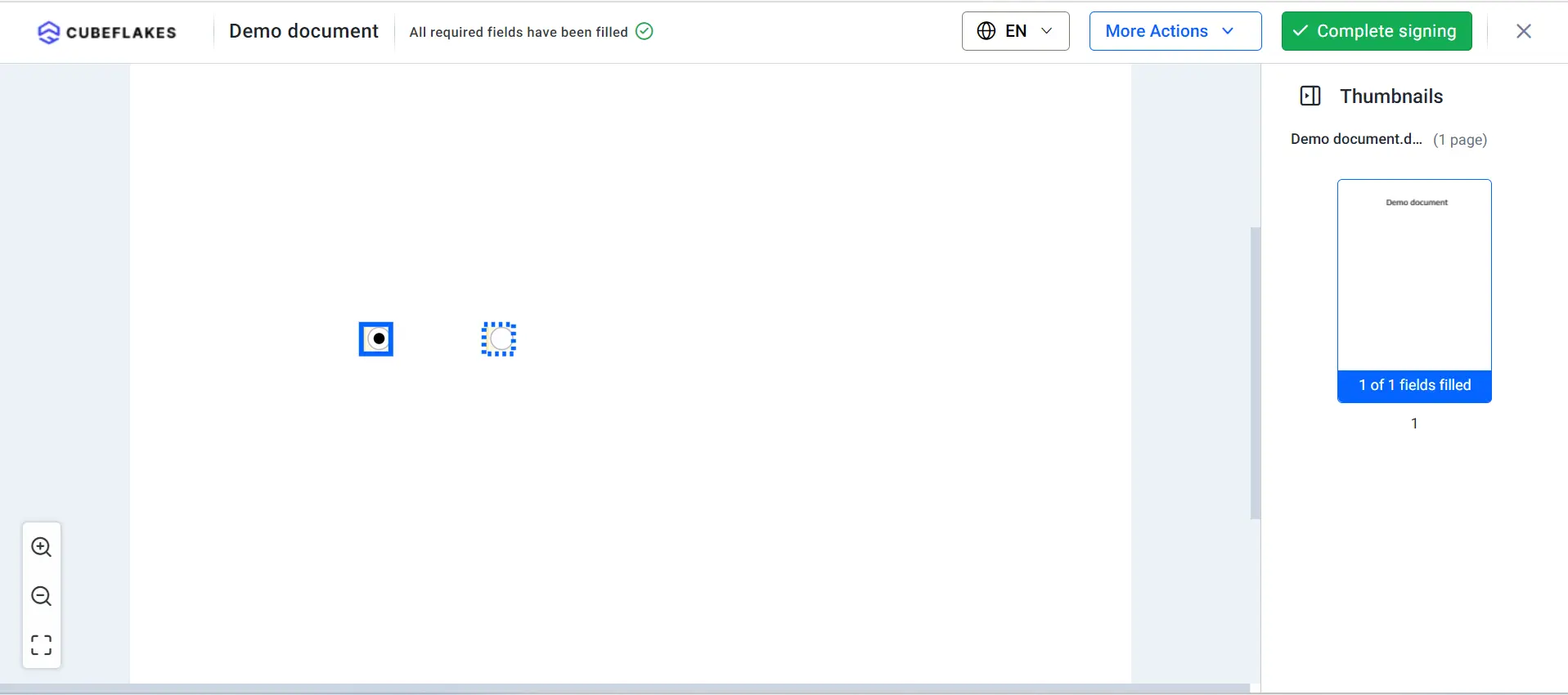
For a visual reference, please take a look at the radio buttons located in the document, as shown in the following image.