


BoldSign AI Assistant
Chat with the BoldSign AI Assistant
Require Signers to Upload Files While Signing
The sender can request attachments from the signers while sending a document by using the Attachment field. This field can be used to collect additional information from the signer, such as a resume or other supporting documentation. This is useful when the signer wants to upload their ID proof, contract terms, etc. A single document can contain multiple attachment fields. The supported file formats are PDF (.pdf), Word (.docx), and Image (.jpg, .jpeg, .png).
You can set Attachment form field as mandatory for signer to upload a documents like ID proof, resume, etc. You cannot complete the signing process when the signer does not upload the document if the Attachment form field is set as mandatory.
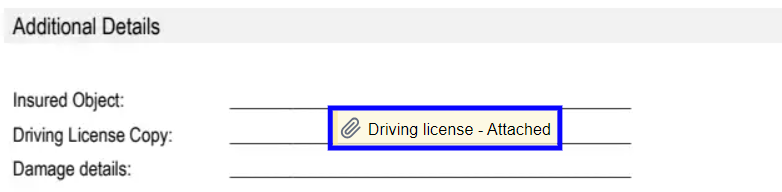
Once the document is uploaded, the Attachment form field will be marked as attached like below image. If the document is not uploaded, the Attachment form field will be marked as attachment.
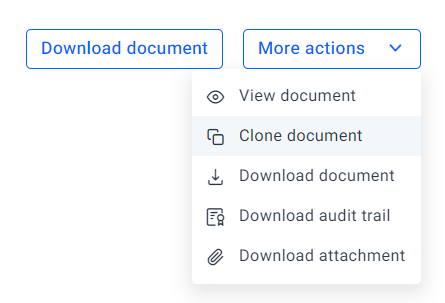
Once you complete the signing process, you can access the attachment using Download attachment under More Actions category.
Lower order signer cannot view the attachment uploaded by higher order signer when we have multiple signers.
Send a document to the signer with Attachment fields:
You can set the Attachment form field by providing attachmentInfo object and you can add title, description and acceptedFileTypes.
Supported Accepted File Types
- DOCUMENT
- IMAGE
Code snippet
curl -X 'POST' \
  'https://api.boldsign.com/v1/document/send' \
  -H 'accept: application/json' \
  -H 'X-API-KEY: {your API key}' \
  -H 'Content-Type: multipart/form-data' \
  -F 'Title="Sample Document"' \
  -F 'Signers={
  "name": "hanky",
  "emailAddress": "[email protected]",
  "signerType": "Signer",
  "signerRole": "Signer",
  "formFields": [
    {
      "id": "Attachment",
      "name": "Attachment",
      "fieldType": "Attachment",
      "pageNumber": 1,
      "bounds": {
        "x": 200,
        "y": 200,
        "width": 125,
        "height": 25
      },
      "attachmentInfo": {
           "title": "Attachment title",
           "description": "Please attach the proof",
           "acceptedFileTypes": ["PDF", "DOCUMENT", "IMAGE"]
        }
    }
  ],
  "locale": "EN"
}' \
  -F 'Files=@{your file}' \
var apiClient = new ApiClient("https://api.boldsign.com", "{Your API key}");
var documentClient = new DocumentClient(apiClient);

var documentFilePath = new DocumentFilePath
{
    ContentType = "application/pdf",
    FilePath = "{Your File path}"
};

var filesToUpload = new List<IDocumentFile>
{
    documentFilePath,
};

var attachmentField = new FormField(
    id: "Attachment",
    isRequired: true,
    type: FieldType.Attachment,
    pageNumber: 1,
    attachmentInfo: new AttachmentInfo(title: "Attachment title", description: "Please attach the proof", acceptedFileTypes: ["PDF", "DOCUMENT", "IMAGE"]),
    bounds: new Rectangle(x: 200, y: 200, width: 125, height: 25));

var formFieldCollections = new List<FormField>()
{
    attachmentField
};

var signer = new DocumentSigner(
    signerName: "David",
    signerEmail: "[email protected]",
    formFields: formFieldCollections,
    locale: Locales.EN);

var documentSigners = new List<DocumentSigner>()
{
    signer
};

var sendForSign = new SendForSign()
{
    Signers = documentSigners,
    Title = "Sample Document",
    Files = filesToUpload
};
var documentCreated = documentClient.SendDocument(sendForSign);
import boldsign

configuration = boldsign.Configuration(host = "https://api.boldsign.com", api_key = "YOUR_API_KEY")

with boldsign.ApiClient(configuration) as api_client:

    document_api = boldsign.DocumentApi(api_client)

    send_for_sign = boldsign.SendForSign(
        title = "Document SDK API",
        document_title = "SDK Document Test case",
        description = "Testing document from SDK integration test case",
        files = ["YOUR_FILE_PATH"],
        signers = [
            boldsign.DocumentSigner(
                name = "Hanky",
                emailAddress = "[email protected]",
                signerOrder = 1,
                signerType = "Signer",
                formFields = [
                    boldsign.FormField(
                        name = "Attachment",
                        fieldType = "Attachment",
                        font = "Helvetica",
                        pageNumber = 1,
                        isRequired = True,
                        bounds = boldsign.Rectangle(x = 100, y = 100, width = 125, height = 25),
                        attachmentInfo = boldsign.AttachmentInfo(
                            title = "Attachment title",
                            description = "Please attach the proof",
                            allowedFileTypes = "PDF"
                        )
                    )
                ],
                privateMessage = "This is private message for signer"
            )
        ]
    )

    document_created = document_api.send_document(send_for_sign)
<?php require_once "vendor/autoload.php";

use BoldSign\Configuration;
use BoldSign\Api\DocumentApi;
use BoldSign\Model\{FormField, Rectangle, AttachmentInfo, DocumentSigner, SendForSign, DocumentInfo, FileInfo};

$config = new Configuration();
$config->setHost("https://api.boldsign.com");
$config->setApiKey('YOUR_API_KEY');

$document_api = new DocumentApi($config);

$form_field = new FormField();
$form_field->setName('Attachment');
$form_field->setFieldType('Attachment');
$form_field->setPageNumber(1);
$form_field->setFont('Helvetica');
$form_field->setIsRequired(true);
$bounds = new Rectangle([50, 50, 100, 150]);
$form_field->setBounds($bounds);

$attachment_info = new AttachmentInfo();
$attachment_info->setTitle('Attachment title');
$attachment_info->setDescription('Please attach the proof');
$attachment_info->setAcceptedFileTypes(['PDF']);
$form_field->setAttachmentInfo($attachment_info);

$document_signer = new DocumentSigner();
$document_signer->setName('Hanky');
$document_signer->setEmailAddress('[email protected]');
$document_signer->setSignerOrder(1);
$document_signer->setSignerType('Signer');
$document_signer->setFormFields([$form_field]);
$document_signer->setPrivateMessage('This is private message for signer');

$send_for_sign = new SendForSign();

$documentInfo = new DocumentInfo();
$documentInfo->setTitle('Document SDK API');
$documentInfo->setDescription('Testing document from SDK integration test case');
$send_for_sign->setDocumentInfo([$documentInfo]);

$files = new FileInfo();
$files = 'YOUR_FILE_PATH';
$send_for_sign->setFiles([$files]);

$send_for_sign->setTitle('SDK Document Test case');
$send_for_sign->setSigners([$document_signer]);

$document_created = $document_api->sendDocument($send_for_sign);
ApiClient client = Configuration.getDefaultApiClient();
client.setBasePath("https://api.boldsign.com");
client.setApiKey("YOUR_API_KEY");

DocumentApi documentApi = new DocumentApi(client);

FormField formField = new FormField();
formField.setName("Attachment");
formField.setFieldType(FormField.FieldTypeEnum.ATTACHMENT);
formField.setPageNumber(1);
formField.setFont(FormField.FontEnum.HELVETICA);
formField.setIsRequired(true);
Rectangle bounds = new Rectangle().x(100f).y(100f).width(100f).height(50f);
formField.setBounds(bounds);

AttachmentInfo attachmentInfo = new AttachmentInfo();
attachmentInfo.setTitle("Attachment title");
attachmentInfo.setDescription("Please attach the proof");
attachmentInfo.setAcceptedFileTypes(Arrays.asList("PDF"));
formField.setAttachmentInfo(attachmentInfo);

DocumentSigner signer = new DocumentSigner();
signer.setName("Hanky");
signer.setEmailAddress("[email protected]");
signer.setSignerOrder(1);
signer.setSignerType(DocumentSigner.SignerTypeEnum.SIGNER);
signer.setFormFields(Arrays.asList(formField));
signer.setPrivateMessage("This is private message for signer");

SendForSign sendForSign = new SendForSign();

File file = new File("YOUR_FILE_PATH");
sendForSign.setFiles(Arrays.asList(file));

sendForSign.setSigners(Arrays.asList(signer));
sendForSign.setTitle("Document SDK API");

DocumentCreated documentCreated = documentApi.sendDocument(sendForSign);
import { DocumentApi, DocumentSigner, DocumentInfo, FormField, Rectangle, SendForSign, AttachmentInfo } from "boldsign";
import * as fs from 'fs';

const documentApi = new DocumentApi("https://api.boldsign.com");
documentApi.setApiKey("YOUR_API_KEY");

const bounds = new Rectangle();
bounds.x = 100;
bounds.y = 50;
bounds.width = 100;
bounds.height = 100;

const formField = new FormField();
formField.name = "Attachment";
formField.fieldType = FormField.FieldTypeEnum.Attachment;
formField.font = FormField.FontEnum.Helvetica;
formField.pageNumber = 1;
formField.isRequired = true;
formField.bounds = bounds;

const attachmentInfo = new AttachmentInfo();
attachmentInfo.title = "Attachment title";
attachmentInfo.description = "Please attach the proof";
attachmentInfo.acceptedFileTypes = ["PDF"];
formField.attachmentInfo = attachmentInfo;

const documentSigner = new DocumentSigner();
documentSigner.name = "David";
documentSigner.emailAddress = "[email protected]";
documentSigner.signerOrder = 1;
documentSigner.signerType = DocumentSigner.SignerTypeEnum.Signer;
documentSigner.formFields = [formField];
documentSigner.privateMessage = "This is private message for signer";

const files = fs.createReadStream("YOUR_FILE_PATH");

const sendForSign = new SendForSign();

const documentInfo = new DocumentInfo();
documentInfo.title = "SDK Document Test case";
documentInfo.description = "Testing document from SDK integration test case";
sendForSign.documentInfo = [documentInfo];

sendForSign.title = "Document SDK API";
sendForSign.signers = [documentSigner];
sendForSign.files = [files];

const documentCreated = documentApi.sendDocument(sendForSign);
In the given example, replace the attachmentInfo values with the desired values. Set the fieldType as Attachment and specify the acceptedFileTypes as the type of file you want the signers to upload. Upon executing the provided code, a document will be generated with the specified attachmentInfo values for the Attachment form fields.